
MeKaFlow

Garage management, finally smooth.

MeKaFlow brings clients, services, invoices, taxes and labels together in one app. You keep track of every vehicle, from the counter to month-end close.
  • Clients
  • Services
  • History
  • Invoices
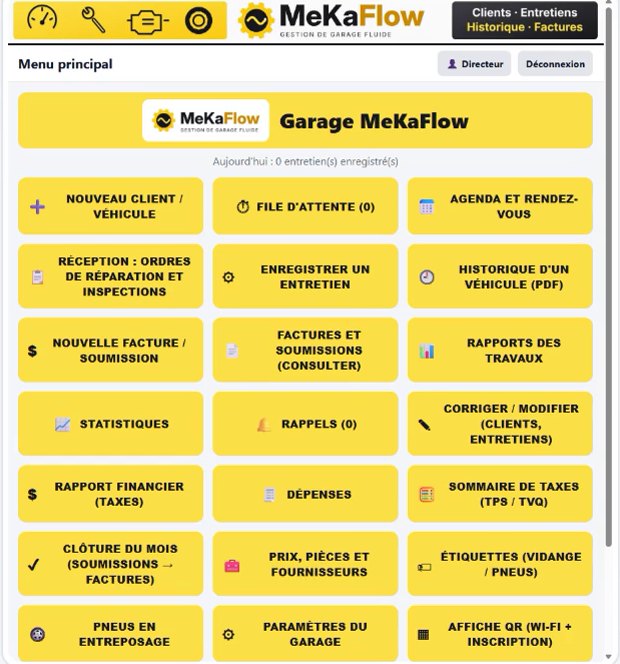
MeKaFlow main menu with buttons for New client, Queue, Appointments, Invoices and Statistics
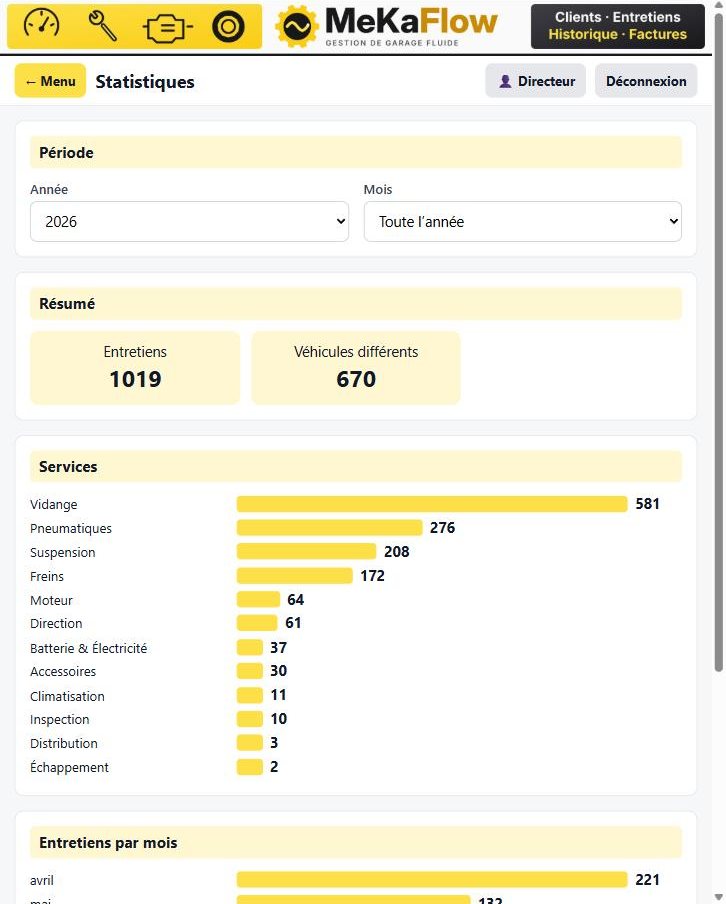
MeKaFlow Statistics screen: year and month filters, summary and breakdown by service
  • Your data stays with you, not in the cloud
  • Several devices at the same time
  • Invoices and quotes with GST / QST

Highlights

A tool built for the pace of a workshop: big buttons, few screens to go through, and everything you need to invoice correctly.

Everything on one screen

The main menu gathers the garage's 21 functions, from greeting the client to invoicing. Each one has its own big button.

Built for Québec

GST / QST tax summary, financial report, expenses, and a month-end close that turns quotes into invoices.

Labels ready to print

Oil change label with mileage, date, oil type and next oil change. Labels for stored tires too.

Clear statistics

Number of services, distinct vehicles, breakdown by service and activity month by month, filtered by year or month.

History for every vehicle

Search by plate, name or phone, find the vehicle's services and export its history as a PDF, with or without comments.

A day under control

Queue, calendar and appointments, reminders: nothing gets lost between check-in and handing back the keys.

21 functions, one menu

Every step of a garage's work has its place in MeKaFlow.

Front desk

  • New client / vehicle (camera scan, VIN decoding)
  • Queue
  • Appointments and calendar
  • Intake: repair orders and inspections

Workshop

  • Log a service
  • Vehicle history (PDF)
  • Work reports
  • Reminders
  • Fix / edit clients and services

Billing and taxes

  • New invoice / quote
  • Invoices and quotes
  • Financial report (taxes)
  • GST / QST tax summary
  • Expenses
  • Month-end close

Parts, tires and garage

  • Prices, parts and suppliers
  • Labels (oil change / tires)
  • Stored tires
  • Statistics
  • QR poster (Wi-Fi + sign-up)
  • Garage settings

Québec taxes and rules, built in

GST, QST, repair orders: MeKaFlow follows the way a garage here works.

The tax summary is a working document, not the official return. Have your accountant review it.

  • GST / QST tax summary laid out like the Revenu Québec return, with the balance to remit or the refund, as PDF and CSV
  • GST and QST always shown separately on invoices, with the new-tire levy one button away
  • Repair order signed by the customer before the work, with a new authorization if the total changes
  • Warranty wording printed on the invoice, with text you can edit
  • Tax period locked once filed

Your customers sign themselves in

Less paper at the counter, and a waiting room that informs.

Sign-in by QR code

The customer scans the poster with their phone, or fills in their file on a tablet at the counter. They show up in the queue right away. The tablet gives access to nothing but sign-in.

Waiting room screen

Time, weather for your city, Wi-Fi QR code and sign-in QR code. The Wi-Fi password is never written on the screen.

Queue and calendar

A vehicle in progress turns green. Today's appointments move into the queue in one click. The calendar reads by day, week or month.

App preview

MeKaFlow Statistics screen: year and month filters, summary and breakdown by service

Your garage in numbers

Pick a year, or a specific month, and see your activity at a glance.
  • Number of services and distinct vehicles for the period
  • Bars by type of service: oil change, tires, suspension, brakes, engine and more
  • Services month by month to follow the seasons
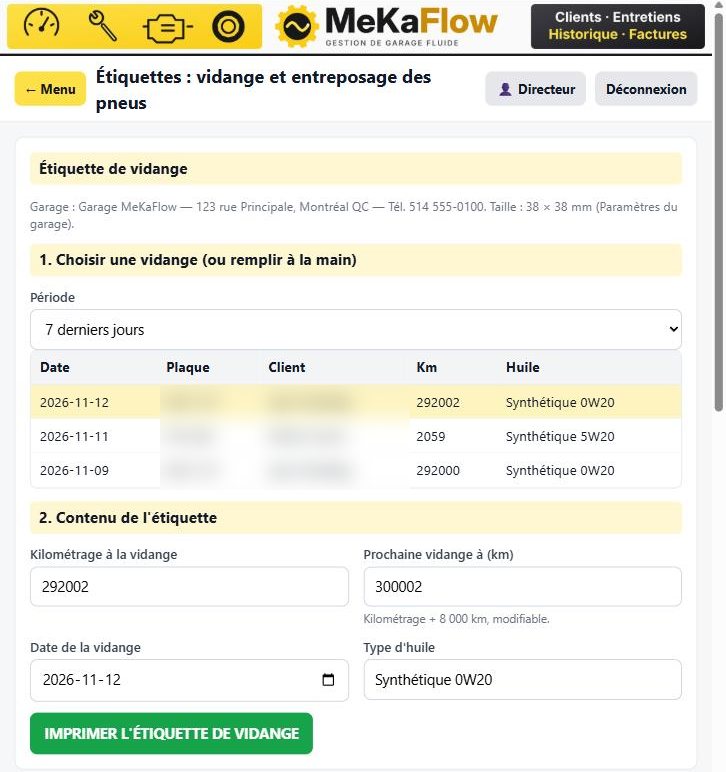
Labels screen: pick a recent oil change, mileage, next oil change, oil type

Oil change and tire labels

Pick a recent oil change or fill it in by hand, then print the label to stick on the windshield.

  • Date, mileage and oil type already filled in from the service
  • Next oil change calculated at +8,000 km, editable
  • 38 × 38 mm format, adjustable in the garage settings
  • Labels also available for tire storage

Screenshots show the app's French interface.

Installed at your garage, easy to keep up to date

MeKaFlow runs on your garage computer. Your other devices connect to it over the garage network.

  • A Windows installer
  • Garage computer, tablet and phone: everything goes through a browser, on the same network
  • Each employee has an account and rights: you choose which pages they see
  • One-click update, with a database backup first, without touching your data
  • Your data stays on the garage computer

Plans

Three plans, from basic tracking to the full workshop.

Essentiel

Clients and services

  • Clients and vehicles
  • Service records
  • Corrections
  • Vehicle history
  • Waiting queue
  • QR poster (Wi-Fi + sign-up)
  • Oil change and tire labels
Write to us

Pro

Invoicing and reminders

Everything in Essentiel, plus:

  • Invoices and quotes
  • Reports
  • Maintenance reminders
Write to us
Most complete

Pro Plus

Full workshop

Everything in Pro, plus:

  • Calendar and appointments
  • Intake: repair orders and inspections
  • Prices, parts and suppliers
  • Expenses
  • GST/QST tax summary
Request a demo

For rates and terms, write to us.

Frequently asked questions

Where is my data?

On your garage computer, in your own database.

Do I need the Internet?

The Internet is used for the waiting room weather, for decoding make, model and year from the VIN, and for managing the subscription.

Which devices does it work on?

The garage computer runs MeKaFlow. The garage's other devices (computer, tablet, phone) connect to it with a browser, on the same network.

Can I limit what my employees see?

Yes. Each employee has an account and a profile: Director, Technician, or a profile you create. You tick the pages they are allowed.

Does MeKaFlow replace my accountant?

No. The tax summary is a working document to help prepare your return. Your accountant reviews it.

How can I try MeKaFlow?

Write to us at contact@mekaflow.ca for a demo.

MeKaFlow on video

Two short presentations: a tour of the menu, then creating a client and their vehicle through to the PDF history.

A tour of the menu18 seconds
Clients and vehicles22 seconds

Simplify running your garage.

Write to us to see MeKaFlow in action and how it fits your workshop.

Request a demo contact@mekaflow.ca